


- Posts: 2
- Thank you received: 0
3 Post Moderation Rule for New Boarders (25 Jan 2021)
New boarders will have their posts moderated - Don't worry if you cannot see your post immediately.
Pixilation / Blockyness on After Capture
- olearyandrew
-
 Topic Author
- Offline
- New Member
-

Less
More
01 Sep 2011 19:02 #1068
by olearyandrew
Pixilation / Blockyness on After Capture was created by olearyandrew
Hi,
I've searched all over the web for an answer to my problem but to no avail. I think it's possible I'm searching the wrong things, so I decided to annoy everyone and just ask everywhere! Here's my problem as concise as I can put it -
I'm working with FCP 7. I'm capturing footage that was shot on a Canon XHA1s (but in SD not HD, yeah, yeah, archaic I know) on minidv. I'm using the same camera to log and capture it into FCP via firewire. The footage was shot in SD on the 25p setting on the camera. PAL.
When I view the footage on a television it looks ok. Not great, but I have a prob with digital anyways, never think it looks good. Back to the point, it looks ok, not too blocky. When I look at it through the Log and Capture window in FCP it looks the same. So far so good. But then I capture it...
When I view the resulting clip in the viewer window (not even on the timeline, so no sequence setting prob) it looks really crap. Block and pixilated. As I said to my brother, it looks like I'm viewing it through one of those old 'moving pictures' you used to get as kids, the ones where you slightly change the angle and it looks like it moves.
Anyway, I'll try attach a screen grab of both the Log and Capture window and the Viewer window so you can see the difference. You notice it on the edges of stuff like the book on the table or the circular seats in the background. I'll also attach a screen grab of the clip properties.
I hope this is a really stupid mistake I've made and someone will be able to give me a simple solution, fingers crossed! I'm prepared to look stupid.
Thanks
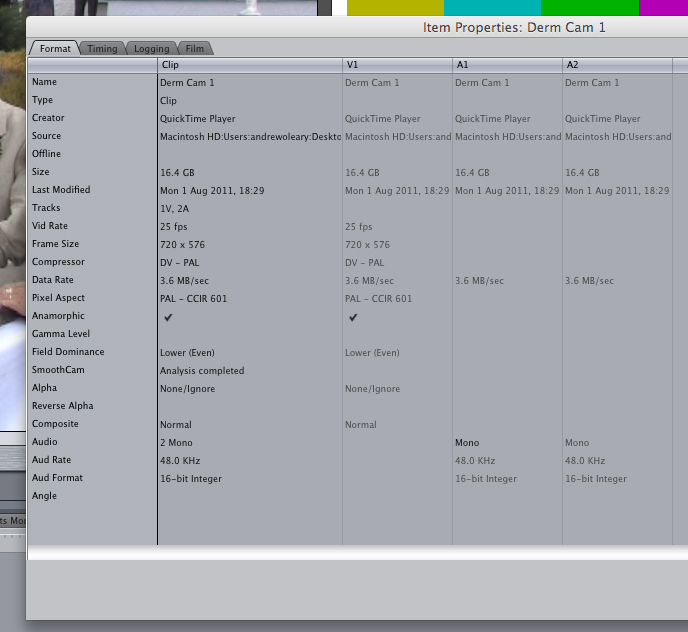
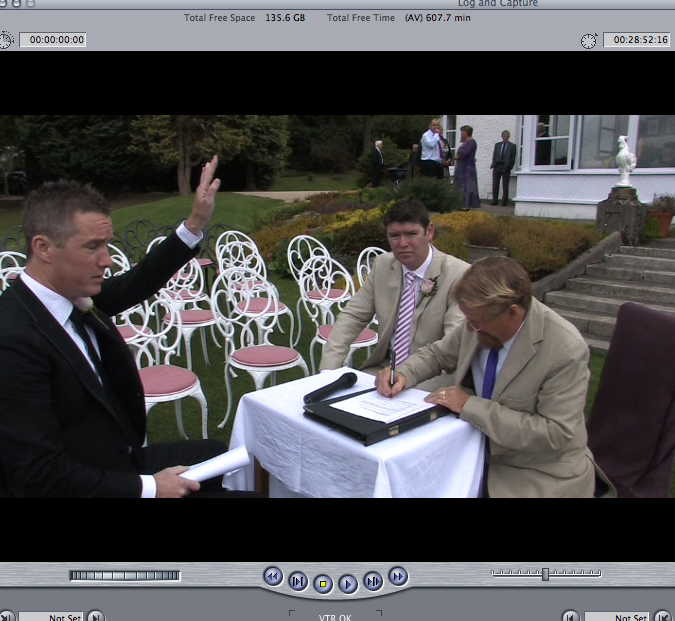
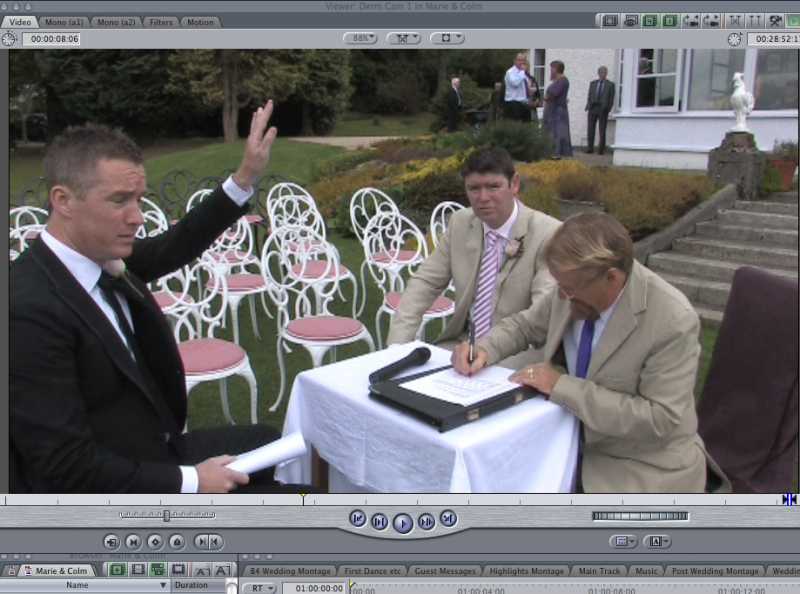
I've searched all over the web for an answer to my problem but to no avail. I think it's possible I'm searching the wrong things, so I decided to annoy everyone and just ask everywhere! Here's my problem as concise as I can put it -
I'm working with FCP 7. I'm capturing footage that was shot on a Canon XHA1s (but in SD not HD, yeah, yeah, archaic I know) on minidv. I'm using the same camera to log and capture it into FCP via firewire. The footage was shot in SD on the 25p setting on the camera. PAL.
When I view the footage on a television it looks ok. Not great, but I have a prob with digital anyways, never think it looks good. Back to the point, it looks ok, not too blocky. When I look at it through the Log and Capture window in FCP it looks the same. So far so good. But then I capture it...
When I view the resulting clip in the viewer window (not even on the timeline, so no sequence setting prob) it looks really crap. Block and pixilated. As I said to my brother, it looks like I'm viewing it through one of those old 'moving pictures' you used to get as kids, the ones where you slightly change the angle and it looks like it moves.
Anyway, I'll try attach a screen grab of both the Log and Capture window and the Viewer window so you can see the difference. You notice it on the edges of stuff like the book on the table or the circular seats in the background. I'll also attach a screen grab of the clip properties.
I hope this is a really stupid mistake I've made and someone will be able to give me a simple solution, fingers crossed! I'm prepared to look stupid.
Thanks
Please Log in to join the conversation.
- peteramwiggins
-

- Offline
- Administrator
-

- The Administrator :)
Less
More
- Posts: 1049
- Thank you received: 404
02 Sep 2011 00:59 #1073
by peteramwiggins
Administrator
Replied by peteramwiggins on topic Re: Pixilation / Blockyness on After Capture
First of all you are using DV which isn't the best codec for detail.
Are you applying filters? Have you used smoothcam?
Are you applying filters? Have you used smoothcam?
Administrator
Please Log in to join the conversation.
- Scrubelicious
-

- Offline
- Platinum Member
-

Less
More
- Posts: 1228
- Thank you received: 114
02 Sep 2011 08:59 #1082
by Scrubelicious
Replied by Scrubelicious on topic Re: Pixilation / Blockyness on After Capture
I also see the smooth cam in the clip properties.
Also give this a crack, it might sound silly but I have seen this before... change your zoom in the canvas to 100% and give it a look. Don't forget your footage is also interlaced so you are not getting a decent preview on your workstation monitors.
Pop a deinterlace on it a see how the footage looks after that.
Also give this a crack, it might sound silly but I have seen this before... change your zoom in the canvas to 100% and give it a look. Don't forget your footage is also interlaced so you are not getting a decent preview on your workstation monitors.
Pop a deinterlace on it a see how the footage looks after that.
Please Log in to join the conversation.
- olearyandrew
-
Topic Author
- Offline
- New Member
-
Less
More
- Posts: 2
- Thank you received: 0
02 Sep 2011 21:05 #1086
by olearyandrew
Replied by olearyandrew on topic Re: Pixilation / Blockyness on After Capture
Hi Guys, thanks for your replies.
Peter, nope, no filters are applied to the clip in either of the pics I posted. I've used Smoothcam elsewhere on similar footage and it makes no difference to the blockness.
Scrubelicious, the smoothcam filter was applied to another section of this footage, but not to this particular bit, I guess the clip props is just acknowledging that the smoothcam analytics have been done. I've viewed it at 100% too, no dice, still looks blockier than the original footage on the tape. De-interlace doesnt affect it either. I've viewed both the original tape and a resulting dvd on a proper television, and the difference is clear to see.
As I've said elsewhere, I understand that SD tape video is never going to look great, I can accept that, and previous videos I've done have all had this same blockyish look and no-one has asked for their money back as of yet, but I just annoys me that the quality that is on the original tapes (poor as it is) is not coming into Final Cut. There's a compression codec somewhere there changing my footage as Final Cut is capturing it and making it look crappier. I just wish I knew what it was so I could stop it. Why can't it just take in the footage as given?
thanks for the replies anyways guy, i'll keep digging...
Peter, nope, no filters are applied to the clip in either of the pics I posted. I've used Smoothcam elsewhere on similar footage and it makes no difference to the blockness.
Scrubelicious, the smoothcam filter was applied to another section of this footage, but not to this particular bit, I guess the clip props is just acknowledging that the smoothcam analytics have been done. I've viewed it at 100% too, no dice, still looks blockier than the original footage on the tape. De-interlace doesnt affect it either. I've viewed both the original tape and a resulting dvd on a proper television, and the difference is clear to see.
As I've said elsewhere, I understand that SD tape video is never going to look great, I can accept that, and previous videos I've done have all had this same blockyish look and no-one has asked for their money back as of yet, but I just annoys me that the quality that is on the original tapes (poor as it is) is not coming into Final Cut. There's a compression codec somewhere there changing my footage as Final Cut is capturing it and making it look crappier. I just wish I knew what it was so I could stop it. Why can't it just take in the footage as given?
thanks for the replies anyways guy, i'll keep digging...
Please Log in to join the conversation.
