


- Posts: 5
- Thank you received: 0
3 Post Moderation Rule for New Boarders (25 Jan 2021)
New boarders will have their posts moderated - Don't worry if you cannot see your post immediately.
Automating in fcp
- Ehigiepaul
-
 Topic Author
- Offline
- New Member
-

Less
More
04 Sep 2011 18:37 #1095
by Ehigiepaul
Automating in fcp was created by Ehigiepaul
Can I automate in fcp
Please Log in to join the conversation.
- Scrubelicious
-

- Offline
- Platinum Member
-

Less
More
- Posts: 1228
- Thank you received: 114
05 Sep 2011 02:10 #1097
by Scrubelicious
Replied by Scrubelicious on topic Re: Automating in fcp
What do you mean Automate?
Please Log in to join the conversation.
- Ehigiepaul
-
Topic Author
- Offline
- New Member
-
Less
More
- Posts: 5
- Thank you received: 0
05 Sep 2011 04:32 #1099
by Ehigiepaul
Replied by Ehigiepaul on topic Re: Automating in fcp
Automation is just the act of creating a set of keyframe and repeat all over again. As like motions wiggle function and others.
Please Log in to join the conversation.
- Scrubelicious
-
- Offline
- Platinum Member
-
Less
More
- Posts: 1228
- Thank you received: 114
05 Sep 2011 13:41 #1101
by Scrubelicious
Replied by Scrubelicious on topic Re: Automating in fcp
Oh you mean a Parameter Behavior as in Apple Motion. 
Nope... unless you use FxBuilder.
Nope... unless you use FxBuilder.
Please Log in to join the conversation.

05 Sep 2011 14:41 #1109
by goestas
Replied by goestas on topic Re: Automating in fcp
I think maybe Ehigiepaul also means copying settings & keyframes between clips (or maybe I misunderstand), or the kind of batch automation - applying a series of mouse/settings actions to different images or, in this case, clips - available in Photoshop? The former is something I can't figure out how to do and am frustrated by, the latter I don't really expect in an editing package, though it would be nice.
Please Log in to join the conversation.
- Scrubelicious
-
- Offline
- Platinum Member
-
Less
More
- Posts: 1228
- Thank you received: 114
05 Sep 2011 14:45 #1110
by Scrubelicious
Replied by Scrubelicious on topic Re: Automating in fcp
Good call, if so that was answered in another thread that he
started
.
To add you can create a nest and your filter and or adjust the Motion Attributes. Second way is to adjust your Filter and Attributes... copy the adjusted clip and select all the clips you want to add the "effect" and right or control click and select Past Attributes... follow the options.
Please Log in to join the conversation.
- Mikeybouchereau
-
- Offline
- Elite Member
-

Less
More
- Posts: 201
- Thank you received: 81
08 Nov 2011 11:03 #2079
by Mikeybouchereau
Replied by Mikeybouchereau on topic Re: Automating in fcp
You can actually create a filter without using FXBuilder for keyframes.
all you have to do is load a clip to the viewer after you have added your keyframes, go to Effects in the menu bar, then choose "Make Favorite Motion" and now the effect is in your favorites named after the clip that it was called.
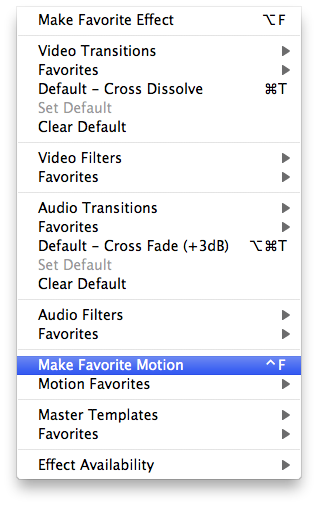

all you have to do is load a clip to the viewer after you have added your keyframes, go to Effects in the menu bar, then choose "Make Favorite Motion" and now the effect is in your favorites named after the clip that it was called.
Please Log in to join the conversation.
