


- Posts: 2
- Thank you received: 0
3 Post Moderation Rule for New Boarders (25 Jan 2021)
New boarders will have their posts moderated - Don't worry if you cannot see your post immediately.
help with a blue LCD screen!
17 Oct 2011 22:31 - 17 Oct 2011 22:36 #1644
by ALQ
help with a blue LCD screen! was created by ALQ
Hello everyone. I am new to this forum and looking for some emergency help. I have a shot of a screen on a coffee pot. There is text on the screen that can be read normally. When the machine is activated the screen turns blue and the text is no longer legible. The videographer knew this so they made an alternate shot with much darker exposure so when the blue screen comes on the text can be read. But I need the first shot because everything is nice and bright.
Does anyone know of a good filter or composite mode that might work to bring out the text of the first shot when the blue screen comes on. I will attach some stills. THANK YOU!
=152]still1.png
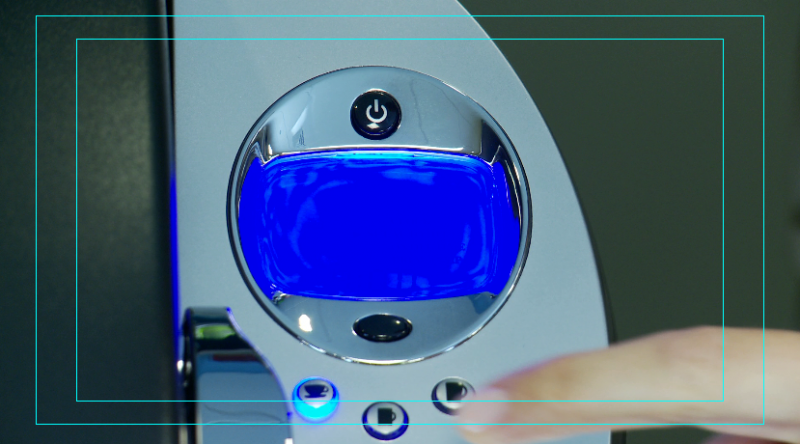
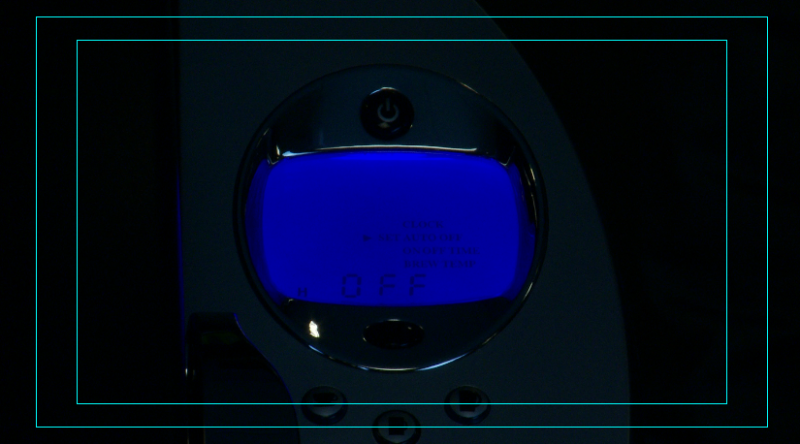
Does anyone know of a good filter or composite mode that might work to bring out the text of the first shot when the blue screen comes on. I will attach some stills. THANK YOU!
=152]still1.png
Last edit: 17 Oct 2011 22:36 by ALQ.
Please Log in to join the conversation.

18 Oct 2011 01:25 - 18 Oct 2011 01:26 #1650
by BenB
Replied by BenB on topic Re: help with a blue LCD screen!
This is what Luma Keys are for. I'd do it in Motion, personally, because I can pull this off very clean and fast there. But in FCP X you can work with it.
First, put the dark one on top of the light one. Crop in the Canvas, using the Trim mode, the top clip as much as you can to clear away as much garbage as you can.
Next, try the Luma Key effect.
help.apple.com/finalcutpro/mac/10.0.1/#ver40b0028e
You may need to go into Motion and draw out a custom matte, also.
If I could download the two clips, I'd love to create a tutorial out of them.
First, put the dark one on top of the light one. Crop in the Canvas, using the Trim mode, the top clip as much as you can to clear away as much garbage as you can.
Next, try the Luma Key effect.
help.apple.com/finalcutpro/mac/10.0.1/#ver40b0028e
You may need to go into Motion and draw out a custom matte, also.
If I could download the two clips, I'd love to create a tutorial out of them.
Last edit: 18 Oct 2011 01:26 by BenB.
Please Log in to join the conversation.
18 Oct 2011 01:38 #1653
by ALQ
Replied by ALQ on topic Re: help with a blue LCD screen!
Thanks for your advice! I tried the Luma Keys but there are moving fingers in the clip so it would have complicated things to have both clips playing at once. My solution was a simple one: I just added the text myself. I lowered the text opacity to 60 and it looks identical to the real LCD screen. The answer was right there. Thanks for your help though!
Please Log in to join the conversation.
