


- Posts: 3
- Thank you received: 0
3 Post Moderation Rule for New Boarders (25 Jan 2021)
New boarders will have their posts moderated - Don't worry if you cannot see your post immediately.
FCP Canon XF Log and Transfer Data Rate question
01 Jul 2013 16:04 #27998
by Rural
FCP Canon XF Log and Transfer Data Rate question was created by Rural
Hello all,
Just wondering if anyone can help sort something out in my head.
I am using FCP7 to Log and Transfer Canon XFC300 footage.
All nice and easy . However I have one major concern. When I look at the clips in Canon XF utility it tells me the data rate is 50 Mbps CBR. What you would expect when shooting 1920x1080 50i on this camera.
In log and transfer I select the Canon Xf plugin and an output of Apple Pro res or Pro Res HQ.
Ingest is fine but when I look at the data rate in my logging bin it shows me the Pro Res in 14 MB/s and Pro Res HQ 22.3 MB/s.
Am I missing the point here or is there a dramatic loss in data rate when ingesting !?!
Please see attached screengrabs
thanks in advance for any help
Just wondering if anyone can help sort something out in my head.
I am using FCP7 to Log and Transfer Canon XFC300 footage.
All nice and easy . However I have one major concern. When I look at the clips in Canon XF utility it tells me the data rate is 50 Mbps CBR. What you would expect when shooting 1920x1080 50i on this camera.
In log and transfer I select the Canon Xf plugin and an output of Apple Pro res or Pro Res HQ.
Ingest is fine but when I look at the data rate in my logging bin it shows me the Pro Res in 14 MB/s and Pro Res HQ 22.3 MB/s.
Am I missing the point here or is there a dramatic loss in data rate when ingesting !?!
Please see attached screengrabs
thanks in advance for any help
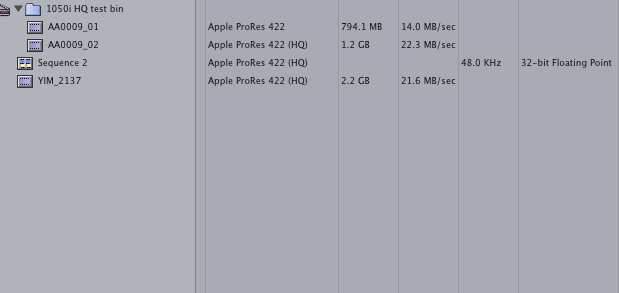
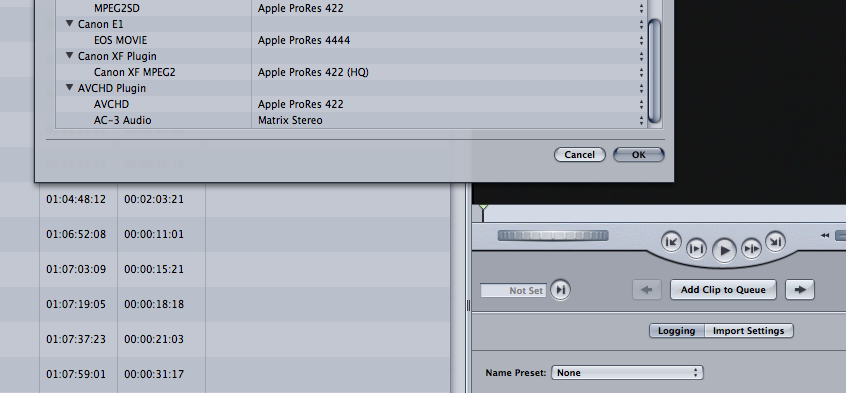
Please Log in to join the conversation.

01 Jul 2013 17:00 - 01 Jul 2013 17:01 #28005
by BenB
Replied by BenB on topic FCP Canon XF Log and Transfer Data Rate question
Where are you seeing the "loss" in data rate? 14MBs is way higher than 50Mbs. ProRes is an all I-Frame codec, and your Canon is recording a very highly compressed Long-GOP codec. Seems OK to me.
Last edit: 01 Jul 2013 17:01 by BenB.
Please Log in to join the conversation.
02 Jul 2013 10:45 #28064
by Rural
Replied by Rural on topic FCP Canon XF Log and Transfer Data Rate question
Yeap apologies...
Realised that it's MB/ps not mbps....never seen it written like that, always as bits. thanks for your reply though
Realised that it's MB/ps not mbps....never seen it written like that, always as bits. thanks for your reply though
Please Log in to join the conversation.

02 Jul 2013 12:46 #28076
by ddixon
Replied by ddixon on topic FCP Canon XF Log and Transfer Data Rate question
Interestingly, many recommend that the footage from the Canon XF10x and 30x cameras does not require transcoding to ProRes but can be edited natively (it's mpeg-2 in an mxf wrapper).
In fact, the current version of FCPX will not even allow converting this footage to ProRes when importing - you don't even have that option. This happened a couple of versions back. Even if you select Optimize in advance, that (checked box and all) is grayed out and the imported footage is not ProRes.
In fact, the current version of FCPX will not even allow converting this footage to ProRes when importing - you don't even have that option. This happened a couple of versions back. Even if you select Optimize in advance, that (checked box and all) is grayed out and the imported footage is not ProRes.
Please Log in to join the conversation.
02 Jul 2013 12:56 #28080
by Rural
Replied by Rural on topic FCP Canon XF Log and Transfer Data Rate question
Yeah, we often cut XF105/305/c300 natively in Avid or transcode to Dnx....I think because we are going to be using multiple cameras to cut seqs in FCP7 and our graphics company want Dnx or Pro Res we are inclined to just convert everything to Pro Res first and avoid and sequence headaches or long exports
Please Log in to join the conversation.
