


- Posts: 3
- Thank you received: 0
3 Post Moderation Rule for New Boarders (25 Jan 2021)
New boarders will have their posts moderated - Don't worry if you cannot see your post immediately.
Problems with converted MXF files to .mov
15 Jan 2014 07:24 - 06 Feb 2014 10:48 #38947
by SIYA
Problems with converted MXF files to .mov was created by SIYA
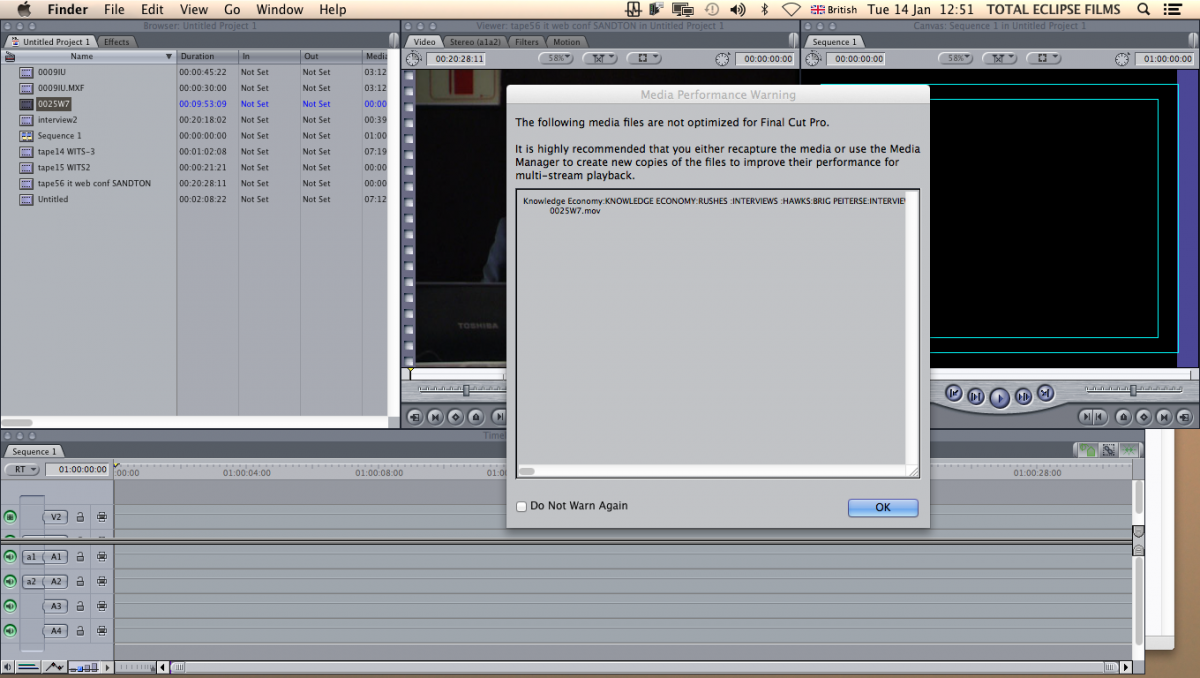
FCP tells me when I import a converted .mov file from a mxf format.
The mxf raw footage was converted using a third party programme.
2. When I try to convert the already converted .mov file in compressor or mpeg stream clip it does not show an image at all meaning that it does not accept the file itself.
3. When I try to play the converted mxf files in FCP it gives me an error message stating its out of memory even though I have space on the internal and external drives and this happens to a few converted files but not all.
Now these files were all converted from a third party program. I would like to know if anyone has contacted you about this type of issue if so how was it resolved and if not how can I resolve this issue.
I know that it may be a codec issue but I was wondering what programme I could download to resolve this issue or do I have to re-trancode using LOG AND TRANSFER in FCP?
Atatched are the still images of what FCP 7 tells me when I try to import footage.
The mxf raw footage was converted using a third party programme.
2. When I try to convert the already converted .mov file in compressor or mpeg stream clip it does not show an image at all meaning that it does not accept the file itself.
3. When I try to play the converted mxf files in FCP it gives me an error message stating its out of memory even though I have space on the internal and external drives and this happens to a few converted files but not all.
Now these files were all converted from a third party program. I would like to know if anyone has contacted you about this type of issue if so how was it resolved and if not how can I resolve this issue.
I know that it may be a codec issue but I was wondering what programme I could download to resolve this issue or do I have to re-trancode using LOG AND TRANSFER in FCP?
Atatched are the still images of what FCP 7 tells me when I try to import footage.
Last edit: 06 Feb 2014 10:48 by peteramwiggins. Reason: Possible spam
Please Log in to join the conversation.

15 Jan 2014 18:55 #38995
by BenB
Replied by BenB on topic Problems with converted MXF files to .mov
What exactly is the source of these MXF files?
Please Log in to join the conversation.
16 Jan 2014 08:35 #39046
by SIYA
Replied by SIYA on topic Problems with converted MXF files to .mov
What do you mean by source?
Please Log in to join the conversation.

16 Jan 2014 12:52 #39054
by cgbier
Replied by cgbier on topic Problems with converted MXF files to .mov
Did the files come from Sony or Canon? If it is from a Canon, that free converter doesn't work - at least I didn't get the files in.
There's a free rewrapper from a Danish guy that work very well my Canon XF file. I'm sorry, I don't have a "real" computer around, so I can't dig out the name of the rewrapper.
With the right plugin you can get your MXF footage "natively" into FCS.
There's a free rewrapper from a Danish guy that work very well my Canon XF file. I'm sorry, I don't have a "real" computer around, so I can't dig out the name of the rewrapper.
With the right plugin you can get your MXF footage "natively" into FCS.
Please Log in to join the conversation.
17 Jan 2014 08:18 #39155
by SIYA
Replied by SIYA on topic Problems with converted MXF files to .mov
The footage came from a Panasonic which used P2 cards.
The files were converted from mxf to .mov files but now when I import them into final cut some of them work and some dont want to work it just gives me an error message of 'out of memory'.
This is very confusing because these files were converted with the same converter.
The files were converted from mxf to .mov files but now when I import them into final cut some of them work and some dont want to work it just gives me an error message of 'out of memory'.
This is very confusing because these files were converted with the same converter.
Please Log in to join the conversation.
06 Feb 2014 06:01 #40623
by akopola
Replied by akopola on topic Problems with converted MXF files to .mov
can you help with mxf files from canon?
Please Log in to join the conversation.
- David_Doyle
-

- Offline
- New Member
-

Less
More
- Posts: 7
- Thank you received: 1
06 Feb 2014 10:43 - 06 Feb 2014 10:44 #40633
by David_Doyle
Replied by David_Doyle on topic Problems with converted MXF files to .mov
Canon MXF files can be imported using their plugin for FCPX
www.canon.co.uk/Support/System/Search.as...h=Canon&SearchType=2
It's called 'Canon XF Plugin for Final Cut Pro X 2.1.1' in case the link doesn't work.
Works fine for me. FCPX imports as the native MXF files without transcoding to Prores (can do this later if required)
Also there's an older plugin for FCP7
software.canon-europe.com/software/0040354.asp
www.canon.co.uk/Support/System/Search.as...h=Canon&SearchType=2
It's called 'Canon XF Plugin for Final Cut Pro X 2.1.1' in case the link doesn't work.
Works fine for me. FCPX imports as the native MXF files without transcoding to Prores (can do this later if required)
Also there's an older plugin for FCP7
software.canon-europe.com/software/0040354.asp
Last edit: 06 Feb 2014 10:44 by David_Doyle. Reason: FCP7 / FCPX links
Please Log in to join the conversation.
06 Feb 2014 11:39 #40635
by akopola
Replied by akopola on topic Problems with converted MXF files to .mov
don't work  Use link for FCP 7.don't see MXF on HDD
software.canon-europe.com/software/0040354.asp
Use link for FCP 7.don't see MXF on HDDsoftware.canon-europe.com/software/0040354.asp
Please Log in to join the conversation.
- David_Doyle
-
- Offline
- New Member
-
Less
More
- Posts: 7
- Thank you received: 1
06 Feb 2014 11:47 #40636
by David_Doyle
Replied by David_Doyle on topic Problems with converted MXF files to .mov
Do you have the INDEX.MIF / .XML's or similar index files available? The converter won't read just a .MXF file - it needs associated index / XML files to be able to import. My card folder layout on some recorded footage is:
CONTENTS (folder)
CLIPS001 (folder)
INDEX (folder
INDEX.MIF
JOURNAL (folder)
NA0107 (folder)
NA0107.CIF
NA0107.XML
NA010701.MXF
NA010701.SIF
I think the NA is a naming convention I set on the camera and the numbers just increments I think.
CONTENTS (folder)
CLIPS001 (folder)
INDEX (folder
INDEX.MIF
JOURNAL (folder)
NA0107 (folder)
NA0107.CIF
NA0107.XML
NA010701.MXF
NA010701.SIF
I think the NA is a naming convention I set on the camera and the numbers just increments I think.
Please Log in to join the conversation.
06 Feb 2014 12:18 #40638
by akopola
Replied by akopola on topic Problems with converted MXF files to .mov
it needs associated index / XML files
HOw?
see screen shot
thanks
HOw?
see screen shot
thanks
Please Log in to join the conversation.
- David_Doyle
-
- Offline
- New Member
-
Less
More
- Posts: 7
- Thank you received: 1
06 Feb 2014 12:27 #40639
by David_Doyle
Replied by David_Doyle on topic Problems with converted MXF files to .mov
The camera recording the content has created the file and folder structure. In my case it's a Canon XF305.
When I've done a shoot I copy the ENTIRE card contents to a folder on my hard drive, then use the import function in FCPX to import the footage.
(see attached screenshot - this is what the structure looks like on my hard drive for a card I copied)
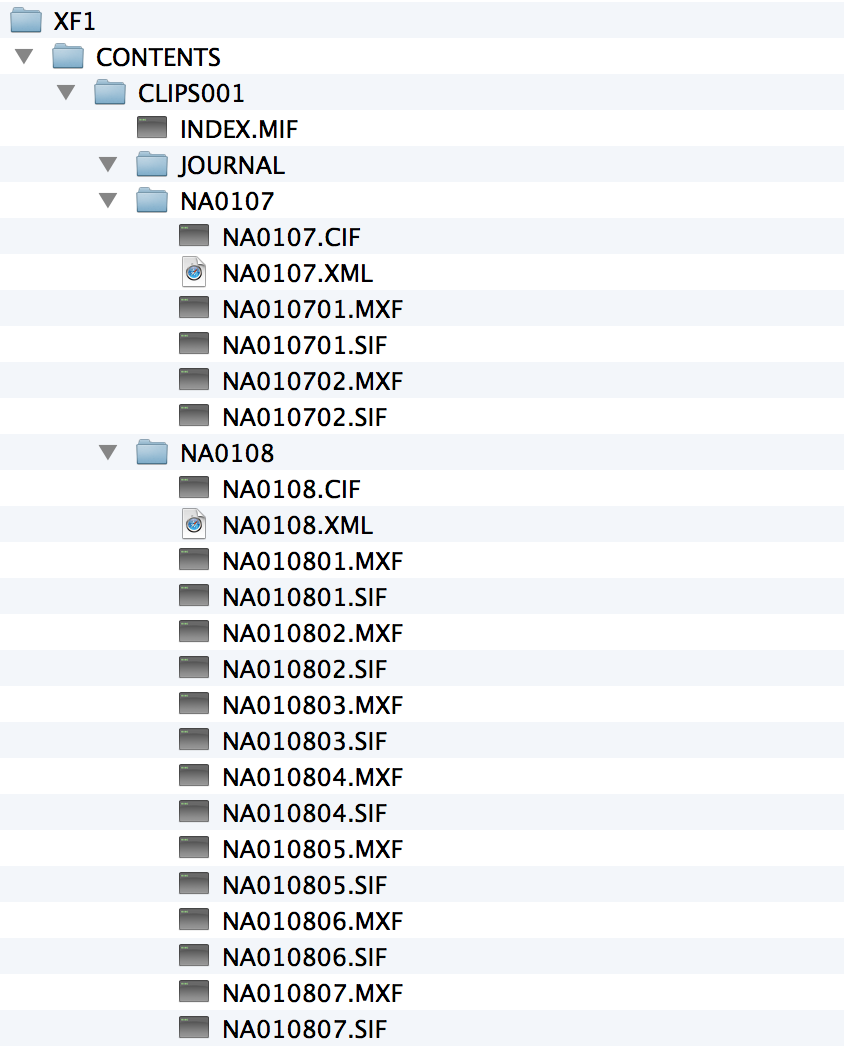
Each camera type may vary - but this gets auto created for me and is managed by the camera.
When I've done a shoot I copy the ENTIRE card contents to a folder on my hard drive, then use the import function in FCPX to import the footage.
(see attached screenshot - this is what the structure looks like on my hard drive for a card I copied)
Each camera type may vary - but this gets auto created for me and is managed by the camera.
Please Log in to join the conversation.

