


3 Post Moderation Rule for New Boarders (25 Jan 2021)
New boarders will have their posts moderated - Don't worry if you cannot see your post immediately.
How can a picture appear from a small square and grow bigger, stay there for x seconds then go away?


Less
More
02 Jan 2016 18:40 #71884
by ulven_
best regards
Freddy
How can a picture appear from a small square and grow bigger, stay there for x seconds then go away? was created by ulven_
Hi, don´t shure if this is the correct place to ask..
but i wonder how i can do this..
in background a film is running, then i want a still picture to grow from a small square to full screen, stay there for a few seconds, then shrink to a small square again and then dissapear. is this possible to do in fcpx?
but i wonder how i can do this..
in background a film is running, then i want a still picture to grow from a small square to full screen, stay there for a few seconds, then shrink to a small square again and then dissapear. is this possible to do in fcpx?
best regards
Freddy
Please Log in to join the conversation.

02 Jan 2016 18:50 - 02 Jan 2016 19:30 #71885
by BenB
Replied by BenB on topic How can a picture appear from a small square and grow bigger, stay there for x seconds then go away?
Yes, you'll simply keyframe the image's Scale value, from zero, to whatever it needs to be to fill the screen, then back; to zero.
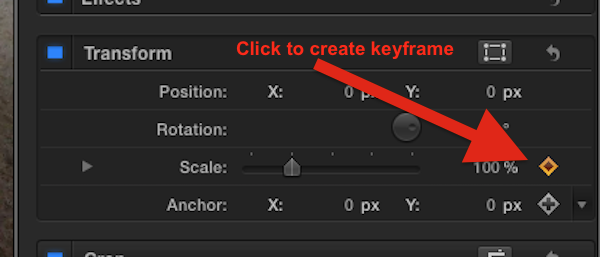
- Place the image in the timeline, on top of your background video.
- Size it to zero scale.
- Set a keyframe in the Inspector for the Scale parameter at the frame it should start to grow.
- Place the playhead at the frame it should fill the screen, adjust Scale. The new keyframe is set automatically after the first one is set.
- Place the playhead on the frame the image should start to shrink, don't change Scale value, just set the keyframe.
- Place the playhead on the frame the image should be back to zero Scale, change Scale to zero. Again, keyframe will be set automatically.
Last edit: 02 Jan 2016 19:30 by BenB.
Please Log in to join the conversation.
02 Jan 2016 19:06 #71886
by ulven_
best regards
Freddy
Replied by ulven_ on topic How can a picture appear from a small square and grow bigger, stay there for x seconds then go away?
Perfect, thank you very much.. it worked 
Is it possible to let the picture slide out of the picture while it shrinks?
Is it possible to let the picture slide out of the picture while it shrinks?
best regards
Freddy
Please Log in to join the conversation.
02 Jan 2016 19:18 #71887
by ulven_
think i found the sollution keyframe and motion
best regards
Freddy
Replied by ulven_ on topic How can a picture appear from a small square and grow bigger, stay there for x seconds then go away?
ulven_ wrote: Perfect, thank you very much.. it worked
Is it possible to let the picture slide out of the picture while it shrinks?
think i found the sollution
keyframe and motion best regards
Freddy
Please Log in to join the conversation.
02 Jan 2016 19:31 #71888
by BenB
Replied by BenB on topic How can a picture appear from a small square and grow bigger, stay there for x seconds then go away?
All the parameters in the Inspector can be keyframed. Sliding in and out is the Position parameter.
Please Log in to join the conversation.
02 Jan 2016 20:10 #71889
by ulven_
best regards
Freddy
Replied by ulven_ on topic How can a picture appear from a small square and grow bigger, stay there for x seconds then go away?
yepp, That was what i did.. learning something new every day now  thank you
thank you best regards
Freddy
Please Log in to join the conversation.
