


- Posts: 120
- Thank you received: 10
3 Post Moderation Rule for New Boarders (25 Jan 2021)
New boarders will have their posts moderated - Don't worry if you cannot see your post immediately.
Automation from AAF
04 Mar 2015 11:19 #60818
by Dawar
Automation from AAF was created by Dawar
Hi,
I don’t know anything about Logic but I’d just like to check an AAF file.
Here you can see there is a fade in-fade out on the clip that isn’t read :

It seems that automation is disabled (in all the project). How can I activate it ?
Thanks
I don’t know anything about Logic but I’d just like to check an AAF file.
Here you can see there is a fade in-fade out on the clip that isn’t read :
It seems that automation is disabled (in all the project). How can I activate it ?
Thanks
Please Log in to join the conversation.

04 Mar 2015 13:27 #60825
by BenB
Replied by BenB on topic Automation from AAF
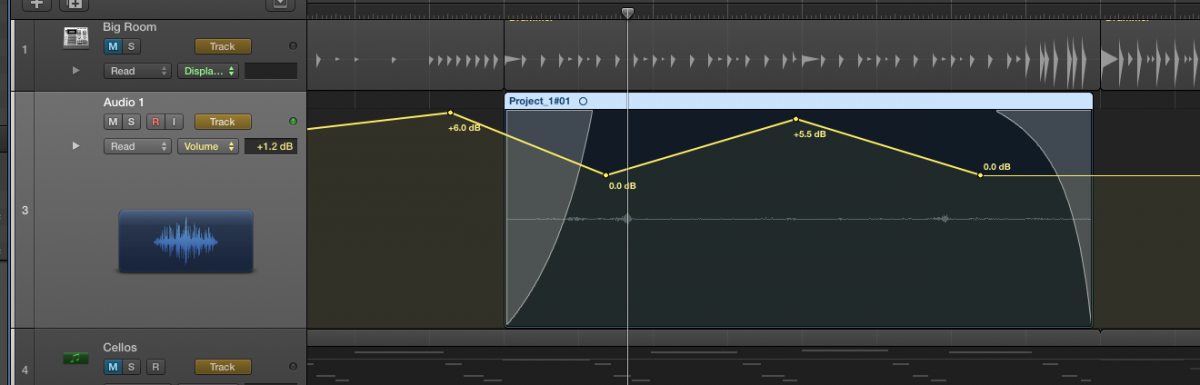
Automation and using the fade tool are two separate things, but, they work at the same time. As you see here, I have both, and the fades work just fine. They should override the automation. Are you on LPX 10.1.1?
Please Log in to join the conversation.
04 Mar 2015 14:39 #60831
by Dawar
Replied by Dawar on topic Automation from AAF
I was talking about the automation.
I can see the automation on the track, but it’s like it’s not activated.
I can’t find a setting to enable it.

Yes, LPX 10.1.1
I can see the automation on the track, but it’s like it’s not activated.
I can’t find a setting to enable it.
Yes, LPX 10.1.1
Please Log in to join the conversation.
04 Mar 2015 15:47 - 04 Mar 2015 16:06 #60833
by BenB
Replied by BenB on topic Automation from AAF
That line down the center is the automation. Click on it to make automation points, then drag them up and down to adjust whatever parameter you have it set to control. I see it, it is activated, although your automation lanes are collapsed, and you have automation data on lower lanes.
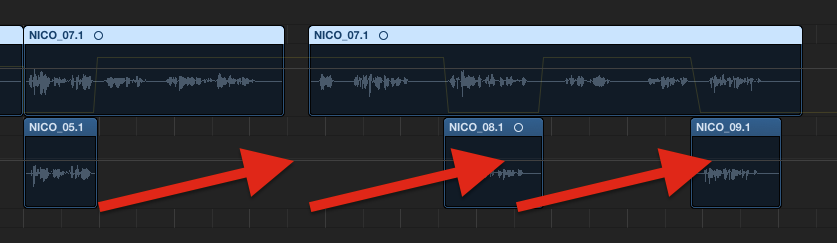
You obviously have two parameters with automation control points, but both below the top level parameter lane, which is Volume, and you have the automation lanes collapsed.
OK, let's try to explain this clearly.
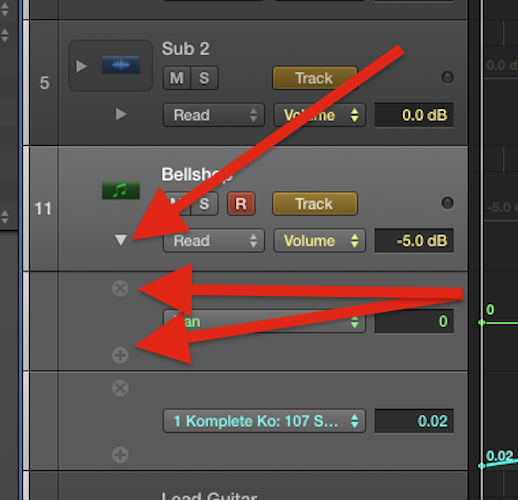
To see more than one parameter at a time, click the disclosure triangle to the left of the automation mode menu (read, touch, latch, write). This opens other copies of the track to show other automation parameters all at once.
OK, here's my three parameters. Volume, Pan, and a Native Instrument plugin control parameter. Notice the two I have keyframes, or made control points in are bright. But Volume, my top level has nothing and is dull.

Now I collapse my automation lanes back to show just one track. Now I see what you see, my two parameter lines automated, but they're dull, because it is collapsed, and the only "visible" one is Volume, and it has no data (control points) mapped out, so it is dull and lifeless.

IF I had data entered (control points) for the Volume automation parameter, it would be bright even when my automation lanes were collapsed, and show the control points, because it is the "top level" lane, and is the only one visible for adjusting, when the automation lanes are collapsed.
So the automation is "active", it is working, you just need to expand the lanes. When you mouse over the lane/track, you'll see light gray plus and minus signs in circles, which let you add or delete lanes to show more parameters, or delete the data for a parameter.
I hope this makes sense, and helps.
You obviously have two parameters with automation control points, but both below the top level parameter lane, which is Volume, and you have the automation lanes collapsed.
OK, let's try to explain this clearly.
To see more than one parameter at a time, click the disclosure triangle to the left of the automation mode menu (read, touch, latch, write). This opens other copies of the track to show other automation parameters all at once.
OK, here's my three parameters. Volume, Pan, and a Native Instrument plugin control parameter. Notice the two I have keyframes, or made control points in are bright. But Volume, my top level has nothing and is dull.
Now I collapse my automation lanes back to show just one track. Now I see what you see, my two parameter lines automated, but they're dull, because it is collapsed, and the only "visible" one is Volume, and it has no data (control points) mapped out, so it is dull and lifeless.
IF I had data entered (control points) for the Volume automation parameter, it would be bright even when my automation lanes were collapsed, and show the control points, because it is the "top level" lane, and is the only one visible for adjusting, when the automation lanes are collapsed.
So the automation is "active", it is working, you just need to expand the lanes. When you mouse over the lane/track, you'll see light gray plus and minus signs in circles, which let you add or delete lanes to show more parameters, or delete the data for a parameter.
I hope this makes sense, and helps.
Last edit: 04 Mar 2015 16:06 by BenB.
Please Log in to join the conversation.
04 Mar 2015 17:26 #60839
by Dawar
Replied by Dawar on topic Automation from AAF
Thanks a lot for this answer Ben.
But I can’t find a parameter corresponding to the automation you see here :

It should be volume automation.
(just in case I checked every other parameter : absolute/relative, pan...)
I don’t understand because last time I checked such an AAF file in LPX I could see it :

Anyway, I don’t want to take your time, I don’t have to work in LPX, just wanted to check my AAF file before sending to the mix...
But I like to understand
But I can’t find a parameter corresponding to the automation you see here :
It should be volume automation.
(just in case I checked every other parameter : absolute/relative, pan...)
I don’t understand because last time I checked such an AAF file in LPX I could see it :
Anyway, I don’t want to take your time, I don’t have to work in LPX, just wanted to check my AAF file before sending to the mix...
But I like to understand
Please Log in to join the conversation.
